Exactly three years ago, when I started my first job after college, I had $28,000 of debt. I essentially freaked out and did everything in my power to set up a plan to get out of debt. I was determined to change my financial situation for the better and opened up a blank Microsoft Excel spreadsheet to “set up a budget”.
I had no idea what I was doing.
I fumbled around while I tried to determine how much to put in the “Entertainment” or “Dine Out” categories. I worked to predict how much I would make each month and then plan for every penny that would be spent or saved. What I realized after a few months of doing this on my own is still evident today.
Budgeting is hard.
Budgeting is frustrating.
And budgeting is not fun.
If I had to guess why 90% of people don’t budget, I think their answers would fall into the above factors. By setting up Mint.com though, my view towards a budget has changed.
My Resistance to Mint.com
Even after knowing about Mint.com for 3 years and considering myself financially savvy, I never set up an account. I checked it out a few times and had a couple friends who used it, but I thought my manual Excel system worked fine.
I liked the freedom of being able to manipulate all of the data that I pulled from all my checking, savings, credit card, and investment accounts. I made room in my busy life to spend hours each month to open up all the websites for these accounts and manually input every single line into my spreadsheets. It was this extreme amount of meticulous tracking that allowed me to stay on track and pay off my debt.
But could it have been easier? Could I have managed my finances even better and with less effort?
The Final Straw
My life has become extremely busy lately with the upcoming wedding, managing this site, taking care of my body, and planning to go on an adventure. I had put the tracking of my spending, budget and pretty much every financial measurement besides my net worth on hold for a few months.
I began to feel out of touch with my finances, even though I was spending so much time writing on Pocket Changed to motivate others to look at theirs. Money was flying out of my accounts faster than it was coming in. There were no reins on the spending habits I developed. I was hurting the savings plans for my longer term goals. Enough was enough.
This week, I sat down and finally set up a Mint.com account.
Why Mint.com and Not Just a Spreadsheet?
Some of the main motivators for why I decided to sign up for Mint.com are:
- My fiancé and I have 3 banks, 5 credit cards, 2 store cards, 3 investment accounts, and one student loan.
- Until we can simplify the accounts, Mint.com is the best way to track them all.
- I want to easily track the costs of our wedding.
- My fiancé and I are saving to go on an adventure soon after we’re married.
- It connects to virtually all of the accounts my fiancé and I have. (Except my 401k)
- It will save me a lot of time spent logging into the accounts and manually entering each entry.
- It is established and safe.
- It is free.
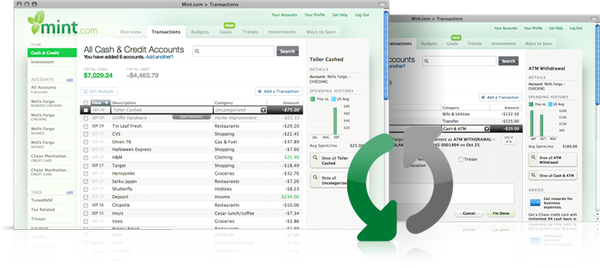
I took the plunge and set up our account to pull in all of our balances and recent transactions. I categorized every entry so that we can see what our spending has looked like over the past few months. I set up a realistic budget for June based on our spending from March to May. Mint.com can be the all in one solution to managing your day to day finances if you put the time into setting it up correctly.
Benefits of Mint.com
When you use Mint.com:
Budgeting is easy.
Budgeting is quick.
Budgeting is actually kinda fun.
I highly recommend you give Mint.com a test run. Don’t just give it 15 minutes or “the old college try” and give up. Set it up completely with all your accounts, label all your expenses that it pulls in for the past 90 days and create a realistic budget with goals to meet. Be sure to check out their mobile phone apps as well.
Remember, there are two elements to reaching financial independence: Making More Money & Spending Less Money. Adopting Mint.com as a money management tool will help you spend less money.
What’s your take on Mint.com or other online tools to help you manage your money? Do you use them or do you have your own system?
(images from Mint.com)


{ 12 comments… read them below or add one }
You are the second blogger that I respect who has recommended mint.com. Yet I still haven’t checked into it. I’m going there right now! Thanks, Caleb.
It definitely takes some time to set up, but the simplicity of doing a “quick look” at your finances, tracking your progress and developing a plan to stick to is fantastic.
Let me know how you like it Vic.
Caleb, great work on this piece pointing out the features of mint.com. I just plugged into this site myself a few weeks ago. Luv it! I immediately dumped Quicken for this simple, cloud-based solution to managing all of my accounts…including my 401(k) account. I dig the iPhone app also.
I’m loving it so far. I just end up manually putting in the value of my 401k occasionally.
Just beware that Mint.com has serious problems with renaming transaction rules. It will frustrate you until you quit like I have and I’ve been using for years. Intuit doesn’t care - must not generate enough revenue especially during these tight financial times.
What transaction rules do you mean?
Hi, sorry - I am referring to the automatic rules that Mint uses to rename and categorize transactions. There are many posts about it on the Mint.com forums (http://satisfaction.mint.com/mint/searches?query=renaming&x=0&y=0&style=topics) and is compounded by user specified rules as well. Basically, this issue can create a mess of your transactions and requires tedious fixing of names and categories causing people to quit Mint.com.
http://satisfaction.mint.com/mint/topics/auto_applied_mint_descriptions_are_too_generic_for_rules_to_work_correctly
http://hithatsmybike.wordpress.com/2011/02/07/mint-com-sucks/
http://www.swduncan.com/archives/2010/01/08/mint-com-is-broken-should-i-keep-going/
Oh, I see what you mean now. I’m used to going through all my transactions line by line anyway, so even just the added bit of automation helps.
What do you use instead of Mint.com?
I use Quicken Essentials for Mac. It’ll automatically pull in all your transactions like Mint (except my main BofA acct) and gives you better control over transaction renaming plus there’s offline use. Both QEM and Mint budgeting fail as far as I’m concerned because neither lets you indicate fixed vs. discretionary expenses or income. They won’t let you budget per paycheck either which I’ve found many people, like me, would find useful.
I’ve used Yodlee (the major supplier of most financial data), PageOnce (simple transactions and acct. alerts), Mvelopes (good but cumbersome), and BofA’s Portfolio. My perfect tool would allow discretionary budgeting and per paycheck, and give you an *easy* way to see upcoming bills and pay them.
I’ve been a user of Mint.com for almost 2 years, but I’m going to be switching to another service in the very near future, possibly as soon as later tonight. The problem is that Mint continually has issues with transaction downloads, often resulting in missing ones — and there is no way to add them manually. (This is also not a new problem, but one several years in the running.) Once a transaction is missed in your Mint account, your budget is basically useless, especially if you use the rolling budget feature. And customer service at Mint? Pretty much nonexistent. The post - http://bit.ly/rmzbfT - pretty accurately sums up the issues that I and a lot of other users have been having, and it also offers up some alternative services.
I will say that Mint does have an incredibly easy to understand and use interface and relatively nice budgeting system. The rolling budget feature is especially nice & useful. But without accuracy and/or the ability to fix errors and missing transactions, Mint is just not a product you can rely on.
I agree with you that there are issues with Mint.com, I just find it to being doing what I want it to do at this point and I know there won’t be any support for it.
I’ve dabbled with Mint.com but would like to use it exclusively if I can. What I’d like to know is if I use a financial software like Microsoft money, can I stop using that and rely on mint.com only? I like the idea of not having to enter debits in Money and just see them on Mint. What would be the pros or cons of just using Mint?
Thanks